I rebuilt this site in 17 hours: Claude Design for the prototypes, Claude Code for tested Next.js code. Before & after, the audit, and what broke.
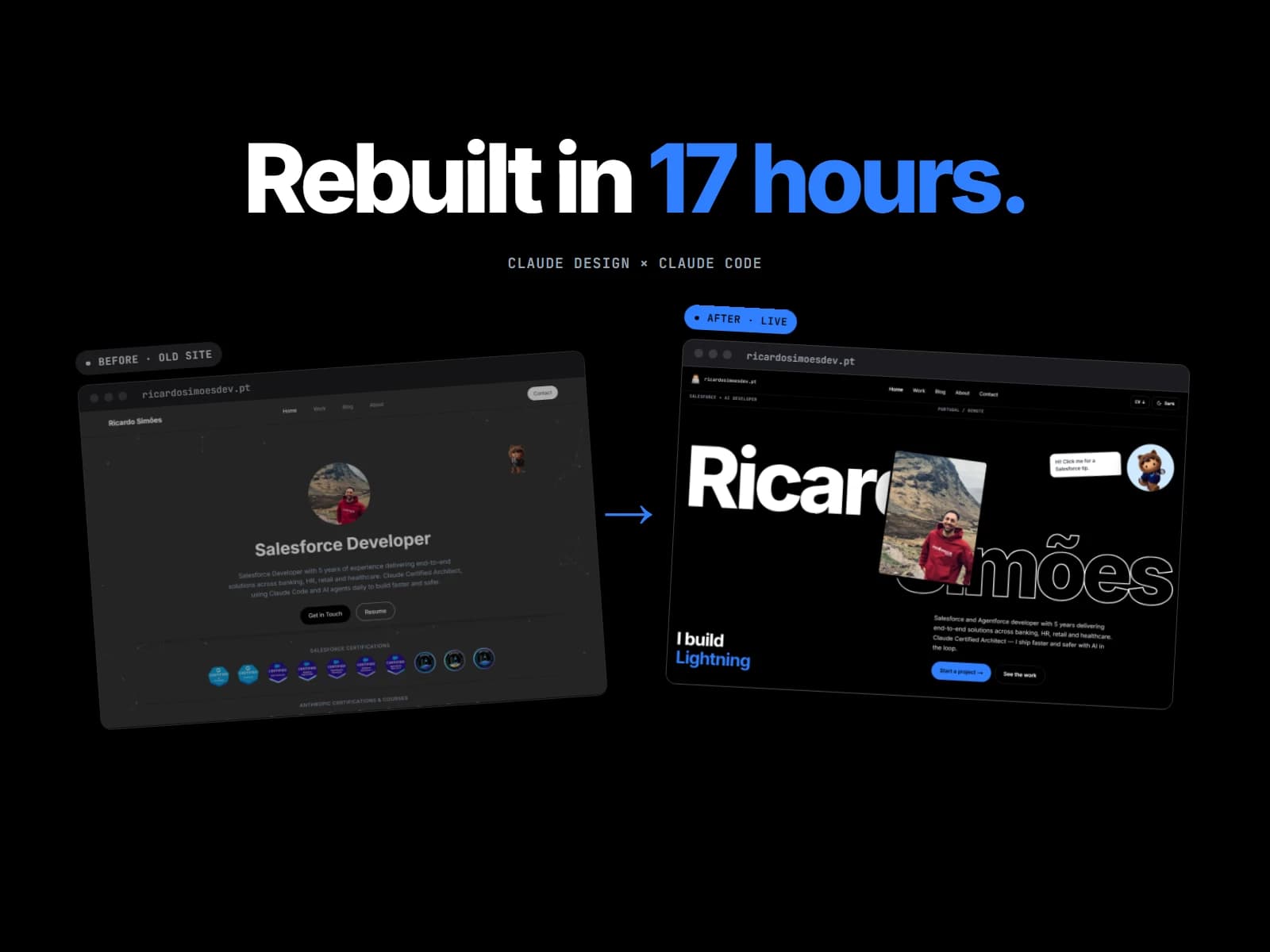
In February 2025 I built this portfolio in one week, stitching together v0, Cursor, GitHub Copilot and Claude.ai. I wrote about it in My AI-Powered Journey: Building My Next.js Portfolio. It worked, but it looked like exactly what it was: a developer’s first website.
Twenty months later I rebuilt the whole thing in 17 hours of actual work: 14 for the redesign, 3 more to make it production-ready. Not a reskin: every public page, the navbar, the footer, the colour system, the blog renderer that reads these posts from Notion, and 121 unit tests that didn’t exist before.
I didn’t type faster. I split the work between two tools that are good at different things: Claude Design is where I decide what the site should look like; Claude Code works out how to build it inside a real codebase.
🧭 The Workflow: Design → Handoff → Code
Each page goes through the same loop. In Claude Design I describe the page in plain words and point at what I want to keep: the mascot, the terminal, the accent blue. Then I iterate on a high-fidelity prototype until it feels right, in dark and light, desktop and mobile.
Then I export the handoff: a self-contained .dc.html prototype plus a README.md with every token, spacing, timing, state and responsive rule. It goes into the repo under docs/superpowers/specs/, next to the code that will implement it.
“It is not production code to copy. Recreate it inside the existing project’s stack, components and patterns.”
That one line from the handoff is the whole philosophy.
Claude Code picks up from there. It reads the handoff and the existing code, then asks where design meets reality. The prototype has 12 placeholder posts with tags; the real blog had 6 at the time, grouped by category. The prototype has an EN/PT toggle; the site isn’t translated yet.
We agree on answers, they go into a spec and a step-by-step plan, and only then does it write code:
- Pure helpers first, with tests. Read time, filtering, outlines, travel stats, contact validation: plain functions covered by Vitest.
- Components second, reusing the site header, footer, theme and tokens.
- One focused commit per feature, all on a
pre-prodbranch.main(production) only moves when I say so. - Review in the browser, feedback in plain words, fix commits, repeat.
🏠 Home
The old homepage was a centred photo, a title and a row of badges on top of a particles background. The new one has a point of view: my name set huge with an outlined second line, a 3D photo that spins in, and the Salesforce mascot handing out tips.
Below the fold:
- How I work: a Claude Code session typed out in a terminal. Click it and it becomes a small shell (
whoami,sudo hire ricardo,sf deploy…). - Certifications as draggable stickers on a board instead of a static badge row.
- Worked with: a globe drawn with d3-geo on a canvas. Each country links to the projects I delivered there, straight from the database.
- Recent posts as a shuffleable card deck, and a restyled feedback form.
Fig. 4 — The whole homepage, top to bottom. Same content, a very different rhythm.
💼 Work
Work used to be a list of cards, each opening its own career detail page. Now it’s one view: a vertical timeline of roles with a progress rail, and a detail panel with Responsibilities, Achievements, Main projects and Technical stack tabs. It advances every 7 seconds, pauses on hover and stops as soon as you take control.
The old detail URLs didn’t break: they now permanently redirect to /work, and the homepage globe deep-links straight to the right role.
📝 Blog & Articles
The blog is where the workflow paid off the most, because it’s where I changed my mind the most.
The first redesign was Field Notes, a magazine layout with a giant masthead and an asymmetric grid. Claude Code built it, tested it and pushed it to pre-prod. In the browser it looked great on its own and wrong next to the rest of the site. So I went back to Claude Design, asked for a version that matched the homepage’s visual language, and got v3.
That’s the real advantage: throwing work away is cheap. A whole design direction cost me a few hours instead of a sprint.
The article page
Articles got the same treatment:
- an animated title and a tilted cover
- a sticky table of contents with reading progress
- numbered sections and figures, code blocks with copy
- pull quotes, “Gotcha” callouts and a mascot tip per section
Fig. 9 — Article page: from a single column to a reading layout with a table of contents.
Everything still comes from Notion. The renderer simply learned a few new tricks. The terminal earlier in this post is just a Notion code block whose caption mentions “claude”:
1// A code block captioned "… claude" (e.g. "~/salesforce-org — claude") becomes a Claude Code terminal
2export function isTerminal(title?: string): boolean {
3  return !!title && /\bclaude\b/i.test(title);
4}
🌍 About
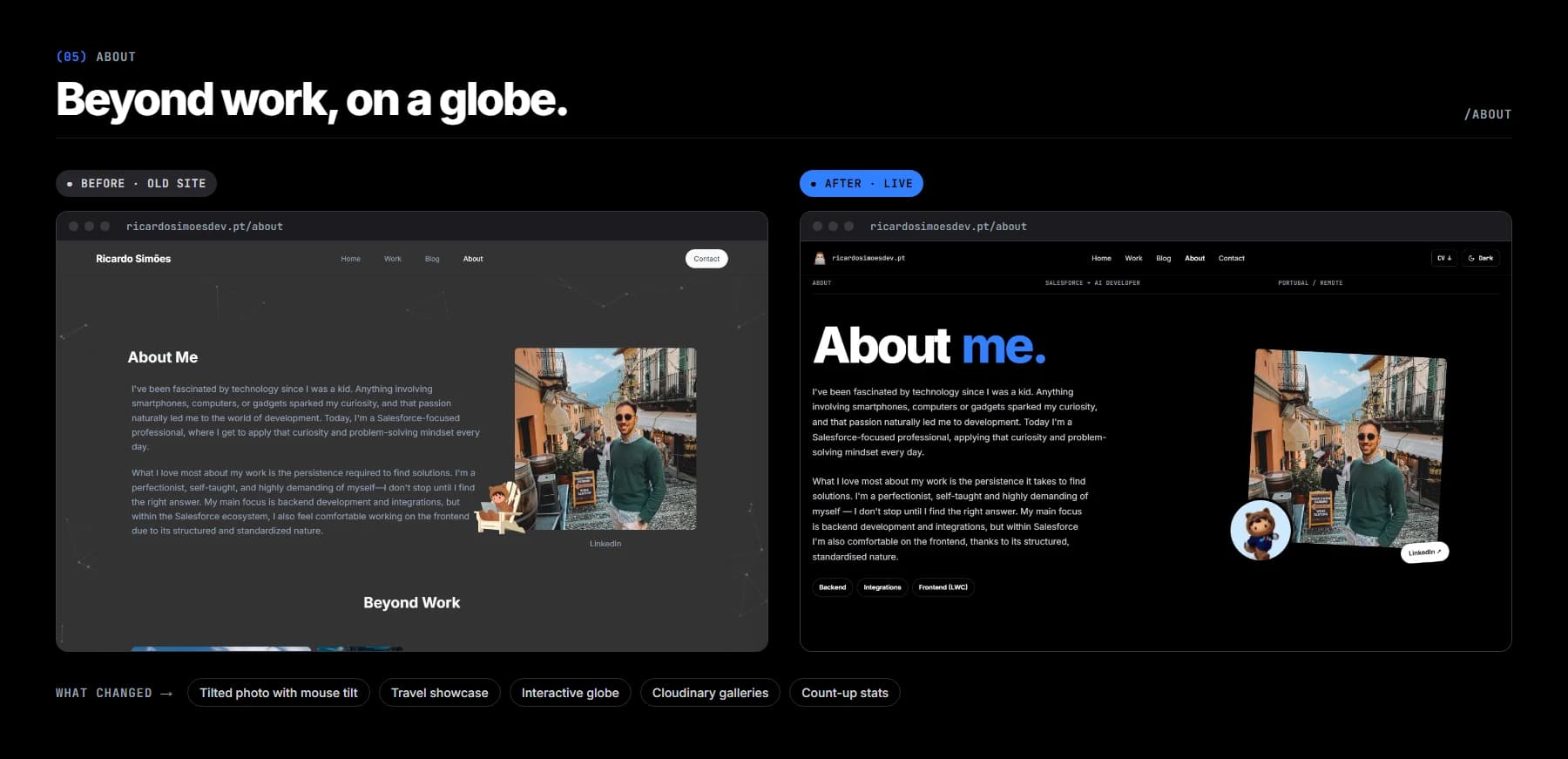
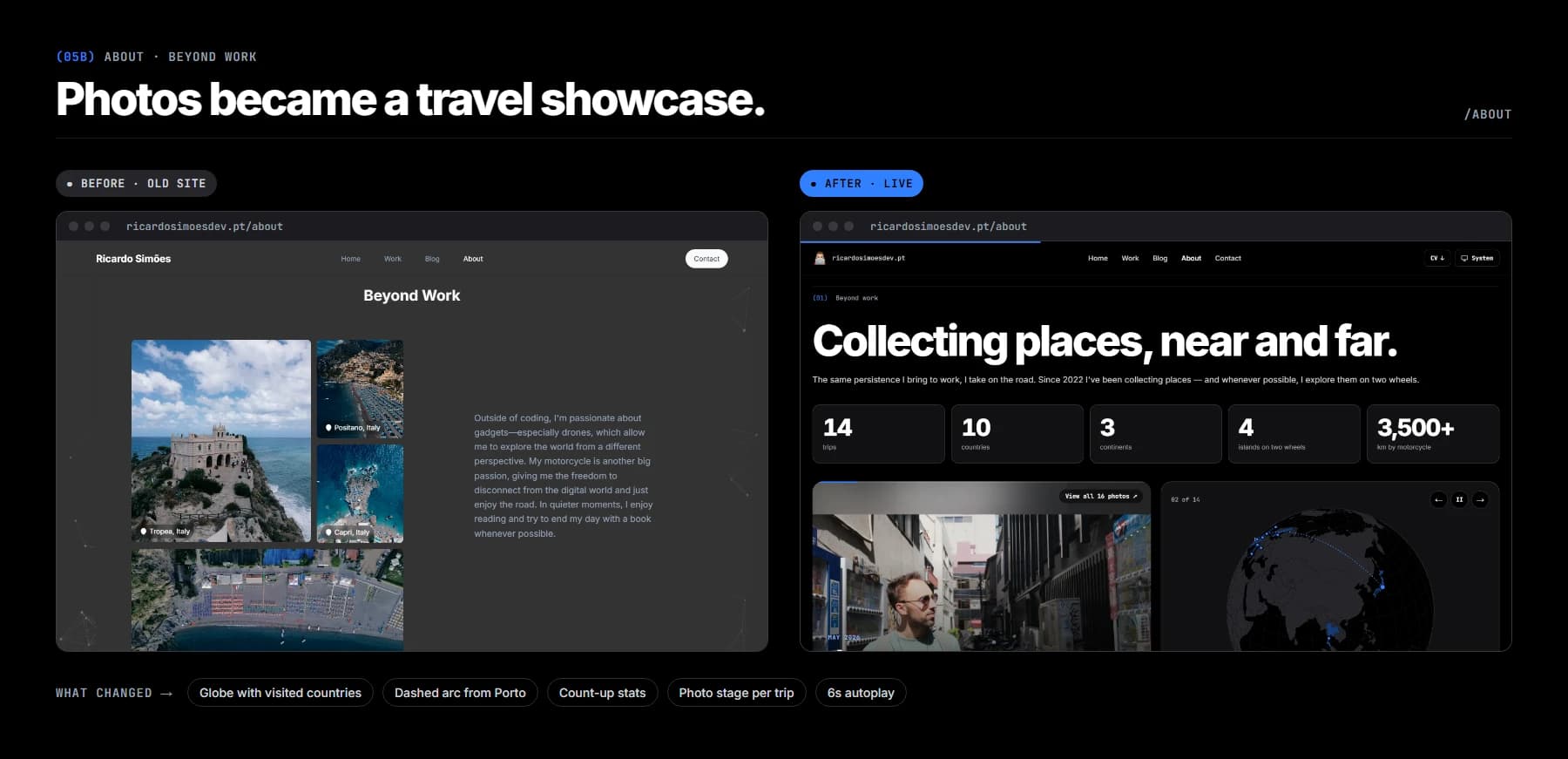
About used to be a text page with a photo carousel. Now the Beyond work section is a travel showcase: an interactive globe with every country I’ve visited, a dashed arc from home (Porto), count-up stats, and a photo gallery per trip. Photos load from Cloudinary folders and are resized on the fly, so the page stays fast.
✉️ Contact
Contact is the one I smile at the most. While you type, a terminal next to the form previews your message as a Salesforce Lead (a sales prospect record) in Apex. When you hit send, it plays out the sf data create record steps while your message is sent to the real API. The validation rules live in one place and run on both the form and the API.
📱 Mobile
Every page was checked on a phone before it went to pre-prod, and some needed their own commits: mobile scroll jumps, a hero that didn’t fit, a footer that wrapped badly. Claude Design gave me the desktop and mobile layouts; Claude Code made sure the in-between widths didn’t fall apart.
🛡️ The Last 3 Hours: Making It Production-Ready
After 14 hours the site looked finished, but it wasn’t ready to ship. I spent 3 more hours on a pre-deploy audit with Claude Code: analyse the project first, run real commands, plan before changing anything, and report every finding with file and line.
It caught what screenshots don’t show:
- Security: admin access fails closed, user input is escaped in emails, and every route sends security headers.
- Dependencies: upgraded to Next 15.5 and React 19 and removed 21 unused packages;
npm auditreports 0. - Performance: article first-load JS dropped from 460 kB to 169 kB.
- Privacy, SEO and accessibility: analytics only after consent, an honest privacy policy, real 404 pages and AA contrast. Skip those 3 hours and all of the above goes live.
⚠️ What Didn’t Go Smoothly
17 hours sounds magical, so here’s the honest part:
- Prototypes use fake data. Every page needed a decision on how real Notion data maps to the design, and those decisions are mine, not the tool’s.
- Notion images expire. Images uploaded to Notion come with links that expire after an hour, which made the new zoomable figures flaky. Claude Code wrote
npm run blog:images, which moves every post image to Cloudinary and relinks it in Notion. - Performance regressions sneak in. Computing read time for every post meant extra Notion calls on each request; it needed a fix commit to limit them. The particles background was removed altogether.
- Motion has to be optional. Every animation respects
prefers-reduced-motion. That’s easy to forget and easy to check, if you ask for it.
🎯 I’m Still the One Deciding
In 2025, AI helped me write code I couldn’t write on my own. In 2026 the shift is different: Claude Design lets me explore and decide what I want, visually and fast, and Claude Code turns those decisions into tested code that fits the codebase I already have.
I picked Field Notes and then dropped it, mapped fake data to real data, reviewed every page in the browser and decided what the audit had to fix before going live. The tools just made each of those decisions cheap enough to make.
If you have a side project that looks the way mine did, give this workflow a weekend. You might surprise yourself. 🚀
Got a question? Send me a message and I’ll help you out.
Happy coding! 👨🏼💻
 Written by Ricardo SimõesSalesforce + AI developer · Portugal / Remote
Comments